Your return policy (Basics)
Set your return window, refund method, postage and return address, and add a different policy for other countries.
Return Rules has three sections, numbered on the page: Basics, Rules and Automation. This article covers Basics, which is your policy. The other two build on top of it.
Your policy is shown as a sentence, something like "30-day window · refund or store credit · prepaid label · items to Manchester". If you went through setup, it's already filled in from your store's refund policy page.
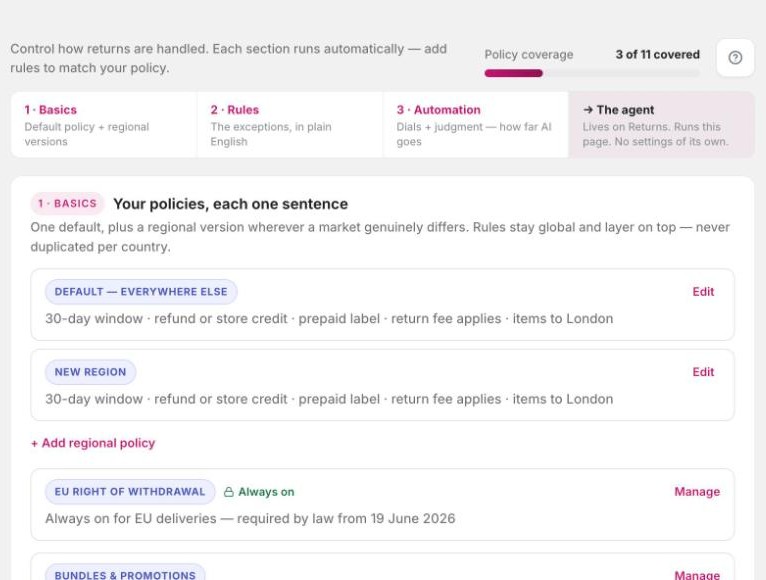
Change your policy
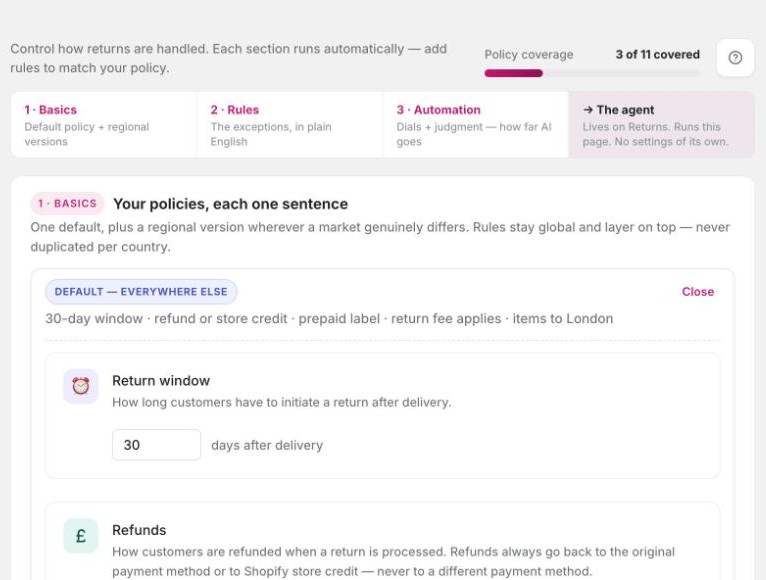
Click Edit on the policy. The main settings open right there on the card.
| Setting | What it controls |
|---|---|
| Return window | How many days customers have to start a return. The count starts at delivery. |
| Refunds | Original payment only, store credit only, or let the customer choose. You can add a store credit bonus here too. |
| Shipping | Prepaid label, customer arranges their own postage, or no returns. For labels, you choose who pays: free for the customer, deducted from the refund, or paid upfront. |
| Return address | Where items get sent. |
Click Advanced for the warehouse and exchange settings. That's where you switch exchanges on or off, decide what happens when the new item is cheaper, and choose whether to hold the exchange shipment until the original has been inspected.
Click Save policy when you're done.
Different terms for other countries
You have one default policy that applies everywhere. If a market really is different (a longer window, another warehouse, customer-paid postage) add a regional policy for it.
Add the region
Under Basics, add a regional policy. Give it a name such as "Norway & Sweden" and pick the countries.
Set what's different
Fill in the window, refunds, shipping and address for that region. Everything you leave alone stays as it is in the default.
Save
A shopper gets the regional policy when their order's shipping address is in one of those countries. Everyone else gets the default.
Your rules are not copied per country. You write a rule once and it applies everywhere, unless you limit that rule to certain countries. Once you have more than one policy, the Rules section gets a Show the effective policy for filter so you can see what applies in each region.
Also under Basics
- Retention offers. Each policy has a switch. Turn it off and shoppers under that policy see no offers at all. See who gets an offer.
- EU right of withdrawal. Always on for EU deliveries. See Right of withdrawal (EU).
- Bundles and promotions. How bundles and Buy X Get Y deals are returned. See Bundles and Buy X Get Y.
Good to know
- A red warning about a missing return address means customers can't start returns yet. Add the address and save.
- Old bookmarks to the separate Policies page still work. They bring you here.