Automation: how much Yoyo decides for you
The Manual, Suggest and Auto settings, what each one means, and how the Let Yoyo button on the Returns page uses them.
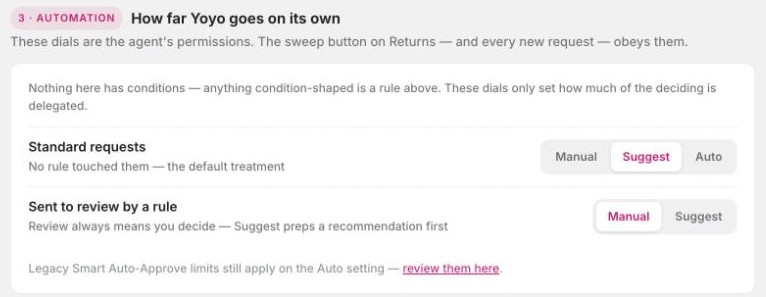
The third section of Return Rules is Automation. It answers one question: when a return comes in, who makes the decision, you or Yoyo?
There are no conditions here. Anything like "only for orders under £100" belongs in a rule. Automation only sets how much you hand over.
The two dials
| Dial | Applies to | Options |
|---|---|---|
| Standard requests | Returns no rule touched. They're inside your policy and nothing unusual came up. | Manual, Suggest, Auto |
| Sent to review by a rule | Returns one of your rules sent to review. | Manual, Suggest |
What the options mean:
- Manual. Every decision is yours. Yoyo just lists the return.
- Suggest. Yoyo checks the return against your policy and recommends a decision, with its reasons. You click approve or reject.
- Auto. Yoyo acts by itself, within your rules.
Returns sent to review can never be set to Auto. If a rule asks for a human, a human decides.
We'd suggest starting on Suggest. After a few weeks you'll know whether you agree with the recommendations, and you can move Standard requests to Auto when you trust them.
Judgment rules
If you've written rules that need AI judgment, such as "refuse clearly worn items", they're listed here too, each with its own Manual, Suggest or Auto setting. You might be happy for Yoyo to handle packaging checks alone but want to see every wear-and-tear call yourself.
Safety limits
Two limits sit above the dials, under Settings → AI & Automation. A return that goes over either one is always left for you, even on Auto.
- Max order value for auto-approval. Leave it empty for no limit.
- Max customer return history. Customers with this many previous returns are always left for you.
The same page has a switch that lets Yoyo reject returns that clearly break your policy, such as ones outside the return window. It's off unless you turn it on. With it off, Yoyo never rejects anything by itself.
The sweep on the Returns page
The Returns page has a Let Yoyo run these button that works through everything waiting in your queue. It follows these same dials. Where you've chosen Auto it acts. Where you've chosen Suggest it prepares recommendations for you. It only runs when you press it. See the Returns page.
Good to know
- A deny rule always denies and an auto-approve rule always approves, whatever the dials say. The dials only cover returns where no rule has decided.
- Changing a dial takes effect on the next request. It doesn't go back and change returns already decided.
- The choice you made during setup ("I approve every return" or "Approve the clear-cut ones for me") set these dials for you. This is where you change it.