Who gets an offer: targeting, policies and limits
Narrow any offer to certain customers, scope it to certain policies, switch offers off for a whole market, and set the limits that protect your margin.
The idea
Every offer is on for everyone unless you narrow it. When you do, there's one question to ask about each offer: who is this customer? Retention lets you target by what you know about the customer: their tags, how many orders they've placed, how often they return. It never targets by what's in the order. That's a job for Return Rules, which can switch offers off for particular products or order values.
So "why did Sarah get £20 of credit?" is always answered on Retention, and "why did this order get no offers?" is always answered in Return Rules.
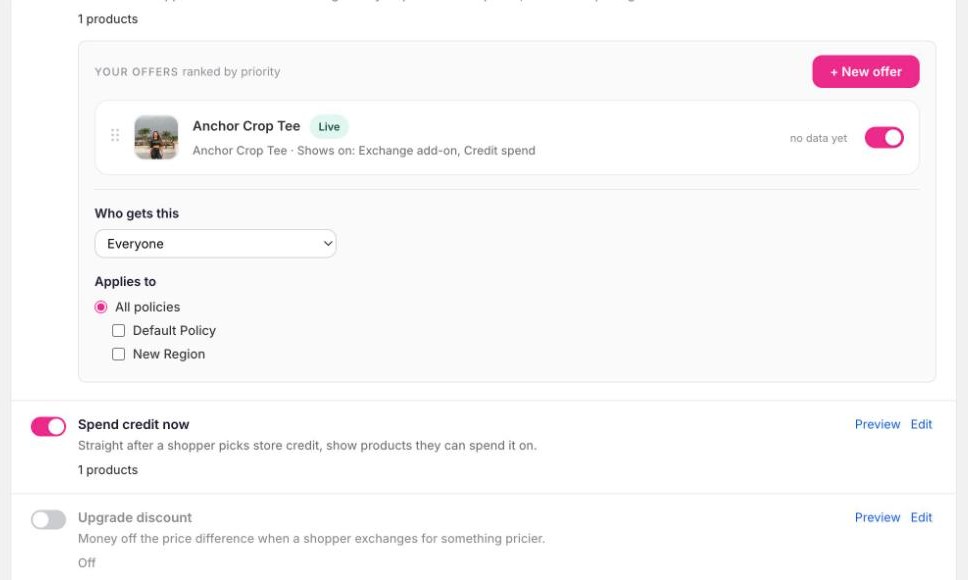
Who gets this
Every row's editor has a Who gets this control with three settings:
- Everyone. The default.
- Only these customers. The offer is shown only to shoppers who match all the conditions.
- Everyone except these customers. The offer is shown to everyone who doesn't match.
Conditions are built from three customer facts:
| Condition | Options | Example |
|---|---|---|
| Customer tag | is / is not | Customer tag is VIP |
| Loyalty level | is / is not · New, Returning, Loyal | Loyalty level is Loyal |
| Returns in 180 days | is at least / is under | Returns in 180 days is at least 2 |
Add more than one condition and they all have to be true. Tags are matched against the customer's Shopify tags, ignoring case.
Open the row and choose a setting
Click Edit, find Who gets this, and pick Only or Everyone except.
Add conditions
A condition row appears: pick the fact, the operator and the value. Use + Add another condition for more. Removing the last one puts the row back to Everyone.
Check with Preview
Open Preview and switch between shoppers. "A customer tagged VIP" and "a customer with 4 returns" are there specifically so you can see your conditions work before you save.
Trusting an audience
When you choose Only these customers, a tick box appears underneath: Trust this audience. Tick it and shoppers who match your conditions get the offer even if they return a lot. Everyone else is still covered by the frequent-returner limit.
This is for customers you already know are worth it. A VIP who orders every month and sends half of it back is often still one of your best customers, and you probably don't want them cut off from offers because of a limit meant for strangers.
The box only appears on Only these customers. Preview tells you when it has applied, with a note like "Shown despite 4 returns".
Two worked examples:
- Add-ons for VIPs only: Add-ons → Only these customers → Customer tag is
VIP. - No come-back credit for frequent returners: Come-back credit → Everyone except → Returns in 180 days is at least 2.
If you previously used "Never offer" tag rules on come-back credit, they've been carried across as Everyone except conditions on the come-back credit and Returns+ rows. Boost rules ("set credit to £20 for tag X") stay where they were, under Segment boosts in the come-back credit editor.
Applies to
If you have more than one return policy, say a UK policy and an international one, each row also has Applies to. Leave it on All policies, or tick only the policies the offer should apply to. A shopper's policy is decided by their shipping country, exactly as in Return Rules.
With a single policy this control is hidden.
Switching offers off for a whole market
Rather than editing seven rows, use the switch on the policy itself. Under Return Rules → Basics, each policy card has a Retention offers line. Turn it off and shoppers under that policy see no offers at all. The Retention page shows "Off for: International" at the top of the Offers card so it's never a surprise.
The two work together: the policy switch says whether a market gets anything; Applies to says which offers it gets.
Limits
The Limits card at the bottom of Retention applies across offers. It's on from the start with sensible defaults.
| Limit | What it does | Covers |
|---|---|---|
| Skip shoppers with N+ returns in the last 180 days | Frequent returners see no offers | Every offer |
| At most N offers per shopper every 90 days | Caps how often one customer is given a credit or reward | Come-back credit, Returns+, exchange rewards |
| Hold back N% of shoppers as a comparison group | Those shoppers see the normal portal, so the results at the top of the page mean something. Minimum 5% | Come-back credit, Returns+, exchange rewards |
| When a product has no cost recorded, assume N% profit | Used by the profit check when a product has no cost price in Shopify. Leave blank to make no offers on unknown-cost items | Come-back credit, Returns+ |
| Never give away more than N% of a return's value across all offers | A ceiling on combined giveaways per return. Blank means no cap | Come-back credit and Returns+ for now |
A row's own Who gets this can be stricter than a limit. For example, one row can say "Everyone except 2+ returns" while the page-wide limit is 3. The only way to be looser is Trust this audience, described above.
How a decision is made
For any shopper and any offer, Yoyo checks, in this order: is the offer on · are retention offers on for this shopper's policy · does the offer apply to this policy · are they over the frequent-returner limit · do they match Who gets this. The first "no" wins, and the same check runs in the portal, in Preview, and when money is issued, so what you see in Preview is what the shopper gets.