Retention overview: every offer in one place
What the Retention page is, the seven offers it holds, where each one appears in your portal, and how to read the numbers at the top.
What it is
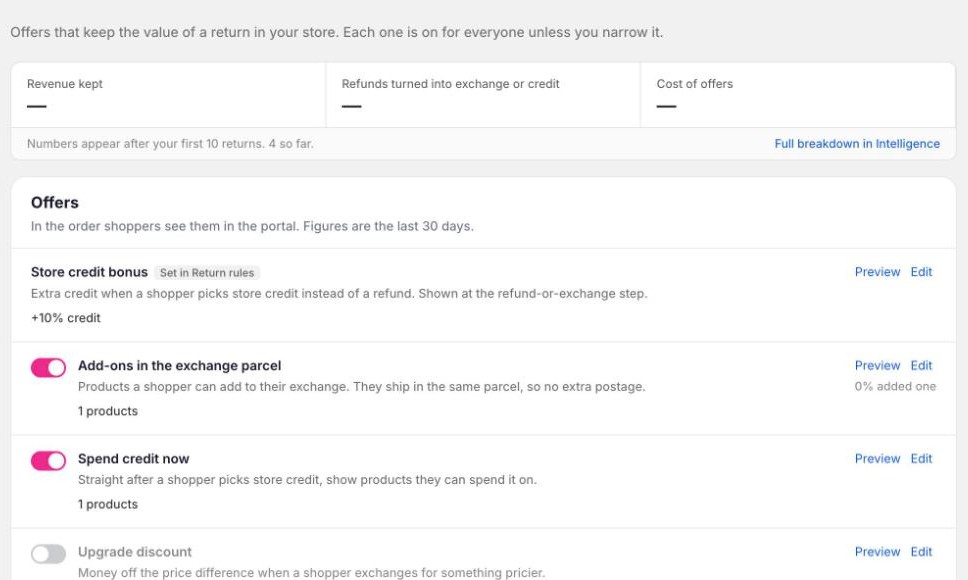
Retention is the page in Yoyo where every offer that keeps the value of a return in your store lives. Open it from the left-hand menu, between Return Rules and Intelligence.
Each offer is one row. A row has a switch, a one-line summary of how it's set, and Preview and Edit links on the right. Nothing on this page has conditions about the order or the item. Those belong in Return Rules. Retention is only about what you offer, and to whom.
Why it matters
Before this page, the same kinds of offer were set in three different places, and a merchant couldn't answer "what does a shopper actually get offered?" without opening all of them. Now the answer is one screen, and every offer works the same way: switch it on, set an amount, decide who gets it.
The seven offers
They're listed in the order a shopper meets them in the portal.
| Offer | What the shopper sees | Where it appears |
|---|---|---|
| Store credit bonus | Extra credit for choosing store credit instead of a refund, e.g. £78 becomes £85.80 | The refund-or-exchange choice |
| Add-ons in the exchange parcel | Products they can add to their exchange, shipped in the same parcel | The exchange screen |
| Spend credit now | Products they can spend their new credit on straight away | Right after choosing store credit |
| Upgrade discount | Money off the price difference when they swap to something pricier | The size or colour picker, and the payment step |
| Come-back credit | A credit for a future order, sent once the return is complete | The confirmation screen |
| Returns+ bundle | Pay a small fee, get the label covered and credit back later | The shipping-label step |
| Exchange reward | A single-use discount code for their next order, for choosing an exchange over a refund | Badged on the exchange option before they choose |
Every offer is off for new stores except the store credit bonus, which comes from your policy, and come-back credit, which is on by default. Switch a row off and no shopper sees it.
Two rows depend on something set elsewhere. Returns+ needs customer-paid return labels, so it's greyed out while all your policies ship returns free. The store credit bonus amount is set per policy under Return Rules → Basics; the Retention row controls the "Most popular" badge and who gets the bonus.
The numbers at the top
Three figures for the last 30 days:
- Revenue kept. The value of returns that ended as an exchange or store credit rather than a refund, plus anything sold through add-ons and spend-credit-now.
- Refunds turned into exchange or credit. The share of decided returns that stayed in the store.
- Cost of offers. Bonus credit paid, come-back and Returns+ credits issued, and add-on discounts, shown as a percentage of revenue kept.
Under each row you'll also see how that offer is doing, e.g. "62% took it · £3,120 kept". Rows that are off show no figures.
These appear after your first 10 returns. If you hold back a comparison group (see Limits), Revenue kept shows how much more you kept than shoppers who saw the normal portal. The full breakdown is in Intelligence.
Preview
Every row has a Preview link. It opens the exact portal step where that offer appears, using the row's current settings, including changes you haven't saved yet. Pick a shopper (new, returning, loyal, tagged VIP, or someone with four returns) and, if you have more than one policy, a policy. If that shopper wouldn't see the offer, the preview dims it and tells you why.
Use it to check a change before you save it, and to see how your Who gets this conditions behave.
Saving
One save bar covers the whole page. Switching a row on or off, changing an amount, or editing who gets it all wait for Save. The one exception is the product list under Add-ons, which saves as you add and remove products.