How return shipping works
The three ways a return can travel back, which carriers are available in which countries, who pays, and how label costs are billed.
A return can get back to you in one of three ways. You choose which in your policy, under Return Rules → Basics → Shipping.
- Prepaid label. The customer gets a label or QR code from the portal and drops the parcel off, or has it collected.
- Customer arranges. The customer posts it back with any service they like. The portal gives them your address and a reference to write on the parcel, and they can add their own tracking number.
- No returns. For a region where you don't accept returns at all.
If you choose prepaid labels but haven't switched on a carrier yet, customers are asked to post it back themselves until you do. Nobody gets stuck.
Which carriers, where
Return carriers collect within their own country. Royal Mail can't pick up a parcel in Stockholm. So the portal only shows a shopper the carriers that work from their address.
| Shopper is in | Carriers | How you connect |
|---|---|---|
| United Kingdom | Royal Mail, Evri, DPD | One click, through Yoyo's shipping account. Or your own Sendcloud account. |
| Sweden, Denmark, Norway, Finland | PostNord, Bring | Your own PostNord or Bring account |
| UAE, Saudi Arabia | Quiqup | Your own Quiqup account |
If a shopper is somewhere none of your carriers reach, the portal tells them to post it back themselves, or to contact you, depending on your policy for that region.
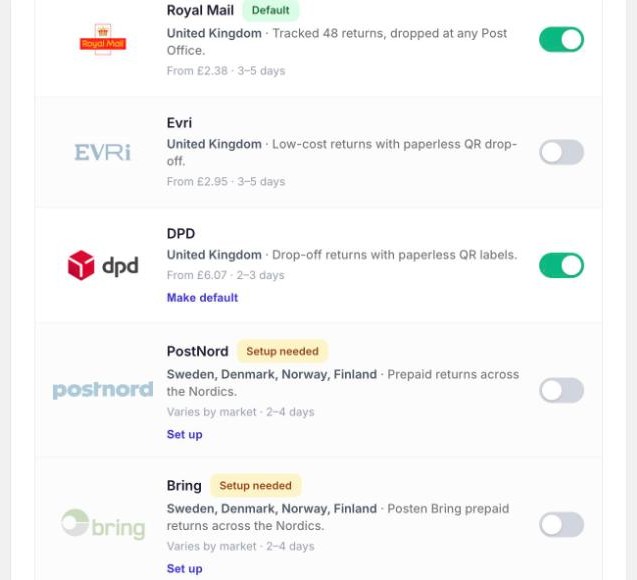
Carriers are managed under Settings → Shipping & Carriers. Flip a carrier's switch to offer it. Make default decides which one is suggested first.
Who pays
In your policy, under Who pays for the label?:
- Free for the customer. You cover it.
- Deduct label cost from refund. The cost comes off what they get back.
- Customer pays upfront. They pay in the portal before they get the label.
You can change this by region with a regional policy, or for particular cases with a rule, such as "VIP customers get free returns".
What labels cost you
Yoyo doesn't add anything to label prices. You pay what the carrier charges.
- With your own carrier account (PostNord, Bring, Quiqup, or your own Sendcloud), the carrier bills you directly, as they do today.
- With Yoyo's shipping account (UK), each label a customer actually uses is added to your Shopify bill. There's a monthly spend cap, £50 to start with, which you can change under Label & budget.
Label formats
Under Label & budget you choose how UK labels are delivered: Print at home (PDF), QR code (no printer needed, Evri and DPD only), or Let customer choose.
Your return address
The Return address card at the top of Shipping & Carriers is the one address every carrier uses. It's filled in from your Shopify store details. Change it if returns go to a different warehouse.
Good to know
- A label that's never used costs you nothing on Yoyo's shipping account.
- If a label can't be created, the customer's return is still confirmed and they're told the label will follow by email. You'll see "No label" on the return, with a Generate label button. See fixing label problems.