Your data: exporting, resetting and privacy
Download your return data, re-run setup, reset your settings, and see what happens to your data if you uninstall.
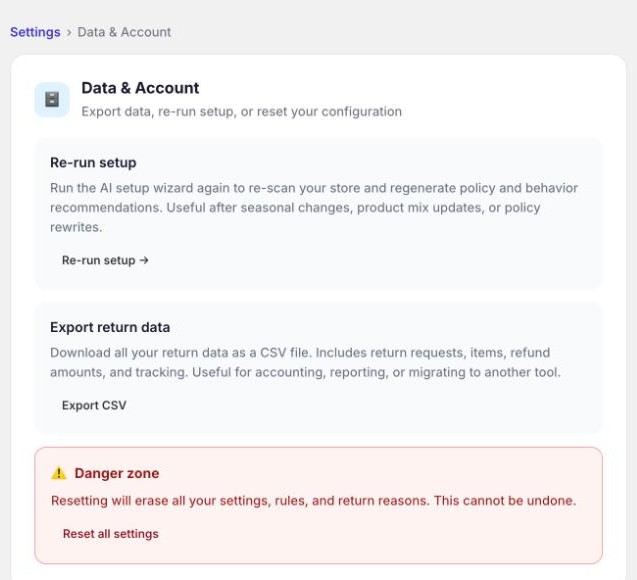
These tools are under Settings → Data & Account.
Export your returns
Export CSV downloads every return as a spreadsheet, including the items, refund amounts and tracking. It's useful for your accountant, for your own reporting, or if you ever move to another tool. It's your data and you can take it whenever you like.
Re-run setup
Re-run setup sends Yoyo back through your store to read your policy page, theme and catalogue again, then drafts a fresh setup for you to review. It's worth doing after you rewrite your returns policy or change what you sell. Nothing changes until you confirm it.
Reset all settings
This is in the Danger zone, and it does what it says. It erases your policies, rules, return reasons, carrier setup and portal branding, and you'll need to go through setup again. Your return history stays. It can't be undone, so Yoyo asks you to confirm.
You'll rarely need it. If something is misconfigured, it's usually quicker to fix that one thing, or ask us.
Where your data lives
Your orders, customers, returns, refunds and store credit all live in Shopify. Yoyo works on them through Shopify and keeps its own record of each return: what was requested, what was decided, and why. We don't store card details.
Photos that customers upload with a damage claim are kept with the return, so you have them as evidence.
If you uninstall
Everything in Shopify stays exactly as it is. In line with Shopify's rules, the data Yoyo holds about your store is erased after you uninstall, and when Shopify sends us a request to erase a particular customer's data, we do it.
If you reinstall later you won't have to go through setup from scratch.
Questions about privacy
Our privacy policy and data processing agreement are on the website. For anything they don't answer, email support@yoyoreturns.com.