Email notifications
Which emails customers get during a return, how they're sent, and the few that Yoyo always sends itself.
Customers expect to hear from you at each step of a return: request received, approved, label ready, refund sent. Yoyo tracks every one of those moments. The emails themselves are sent through your Klaviyo account, so they come from your address, in your design, next to the rest of your customer emails.
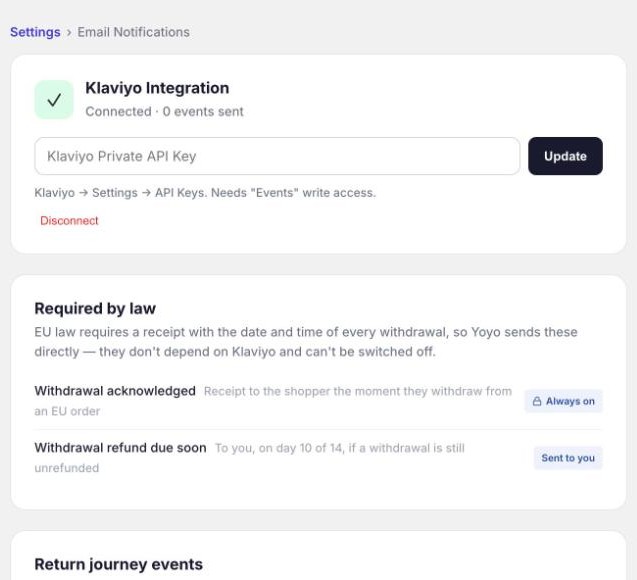
Everything is managed under Settings → Email Notifications.
The moments you can email on
| Stage | Event | When it happens |
|---|---|---|
| Request | Return Submitted | The customer sends their request |
| Request | Return Approved | It's approved, by you or automatically |
| Request | Return Denied | It's rejected. Your reason is included. |
| Request | Return Cancelled | The request is withdrawn by you or the customer |
| Shipping | Label Created | Their label or QR code is ready |
| Shipping | Package Picked Up | The carrier scans the parcel |
| Shipping | Arrived at Warehouse | The parcel reaches you |
| Resolution | Refund Issued | Money or store credit has been sent |
Once Klaviyo is connected, every event shows as Active and is sent automatically. If you don't want an email for one of them, don't build a flow for it. There are a few more events for nudges and rewards, listed in the Klaviyo article.
Setting it up
Connect Klaviyo, then build one flow per event. The Klaviyo article walks through both. You can send yourself a test of any event from this page. Type an address into Test email address and a Test button appears next to each event.
Emails Yoyo always sends itself
A few messages don't depend on Klaviyo, because the return can't work without them:
- Verification codes, when a shopper uses Find by email in the portal.
- EU withdrawal receipts. The law requires a dated receipt for every withdrawal, so these can't be switched off. They're marked Always on.
- Withdrawal refund due soon. This one goes to you, not the customer, on day 10 of 14 if a withdrawal still hasn't been refunded.
If you don't use Klaviyo
Right now the return journey emails need Klaviyo. Without it, customers still see every instruction, label and QR code on the portal's confirmation screen, and they can download or save them there, but they won't get follow-up emails as the return progresses.
We're building return emails that work without Klaviyo and still come from your own address. If that matters to you, tell us, because it helps us decide what to build first.
Good to know
- Every event carries the customer's language, so one flow can send Swedish to Swedish shoppers and English to everyone else.
- When you reject a return, the message you type is included in the event. Put it in your Return Denied email so the customer sees your actual reason.