Refunds, store credit and restocking
What happens in Shopify when a return is approved, how store credit is issued, how stock is put back, and what to do if a refund fails.
Yoyo doesn't keep its own set of books. Everything it does with money or stock is done in Shopify, on the original order, so your reports and your accountant see what they'd expect.
What approval does
When a return is approved, by you or automatically:
- The return is accepted on the Shopify order.
- The customer gets what they chose in the portal. You don't pick this at approval time, the customer already has.
- Refund: sent to their original payment method through Shopify.
- Store credit: issued by Shopify to the customer's account, with any bonus added.
- Exchange: the new item is released to be fulfilled like any other order.
- The Shopify return is closed and the order shows as returned.
- The customer is emailed.
The refund amount is the item value minus anything your policy takes off, such as a return fee or label cost. You can see the full sum on the return card before you approve.
Holding an exchange until you've seen the original
New policies start with Hold exchange shipment until return inspected switched on. The replacement is reserved for the customer but stays on hold in Shopify until you approve the return. If you'd rather send replacements straight away, turn it off in your policy (Return Rules → Basics → Advanced).
There's also an Exchange hold deadline. If the customer hasn't sent the original back within that many days, the exchange is cancelled and the stock goes back on sale.
Restocking
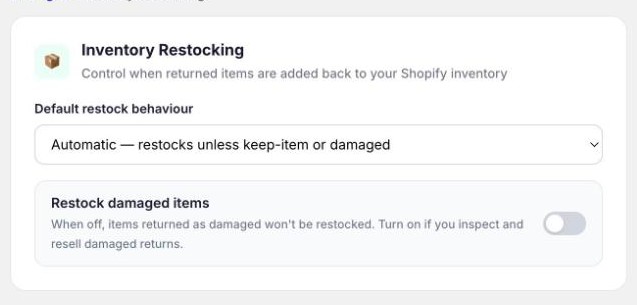
Settings → Inventory Restocking decides when returned items go back into your Shopify inventory.
| Option | What it does |
|---|---|
| Automatic | Restocks everything except items the customer kept and items returned as damaged. |
| Always restock | Restocks everything. |
| Never restock | Yoyo leaves inventory alone and you handle it yourself. |
| Ask every time | You choose on each return when you approve it. |
Restock damaged items is a separate switch. Leave it off unless you inspect and resell damaged returns.
If a refund fails
It's rare, but Shopify sometimes refuses a refund. The usual reason is that the original payment can no longer be refunded. The return stays Approved, the history shows what went wrong, and the card offers Retry refund. If it fails again, refund the order from Shopify admin. The card has a link to the order.
Good to know
- Extras the customer paid for in the portal, such as a price difference, are refunded automatically if you reject or cancel the return.
- Store credit is spent at your normal Shopify checkout. The customer doesn't need a code.
- To refund a different amount from the one Yoyo calculated, do the refund on the order in Shopify.